Docker: Containers, Images, and the Shared-Kernel Model
Introduction
Most engineers have met the failure mode long before they meet Docker: code that runs cleanly on one machine and refuses to start on another. The cause is rarely the code itself. It is the surrounding environment — a different library version, a missing system package, a Python interpreter that is a minor release behind, an environment variable that existed only in someone's shell profile. The traditional answer to "it works on my machine" was, only half-jokingly, "then we'll ship your machine." Containers are, in effect, the disciplined version of that joke: ship the environment with the application, as one unit.
Docker is the tool that made this packaging model mainstream. It did not invent the underlying isolation primitives — those existed in the Linux kernel beforehand — but it wrapped them in a workflow simple enough that the barrier to entry collapsed. The result reshaped how software is built, tested, distributed, and deployed, and it is now difficult to work in backend services, CI/CD pipelines, or cloud infrastructure without encountering it.
What Docker Actually Is
A container is an isolated process (or group of processes) running on a host operating system, made to behave as though it has its own filesystem, network stack, and process table. The isolation is provided by Linux kernel features — primarily namespaces (which give a process its own private view of resources such as the filesystem, process IDs, and network interfaces) and control groups, or cgroups (which cap how much CPU, memory, and I/O that process may consume). Docker orchestrates these features so an application sees a clean, predictable environment regardless of what the host happens to have installed.
Two terms are worth separating early, because they are routinely conflated:
- An image is a read-only template: a layered, immutable snapshot of a filesystem plus metadata describing how to start the contained process. It is the artifact you build, store, and distribute.
- A container is a running instance of an image — the image brought to life as an actual process, with a thin writable layer on top for any changes made at runtime.
The relationship mirrors a class and its object, or a compiled binary and the process it spawns. One image can back many containers.
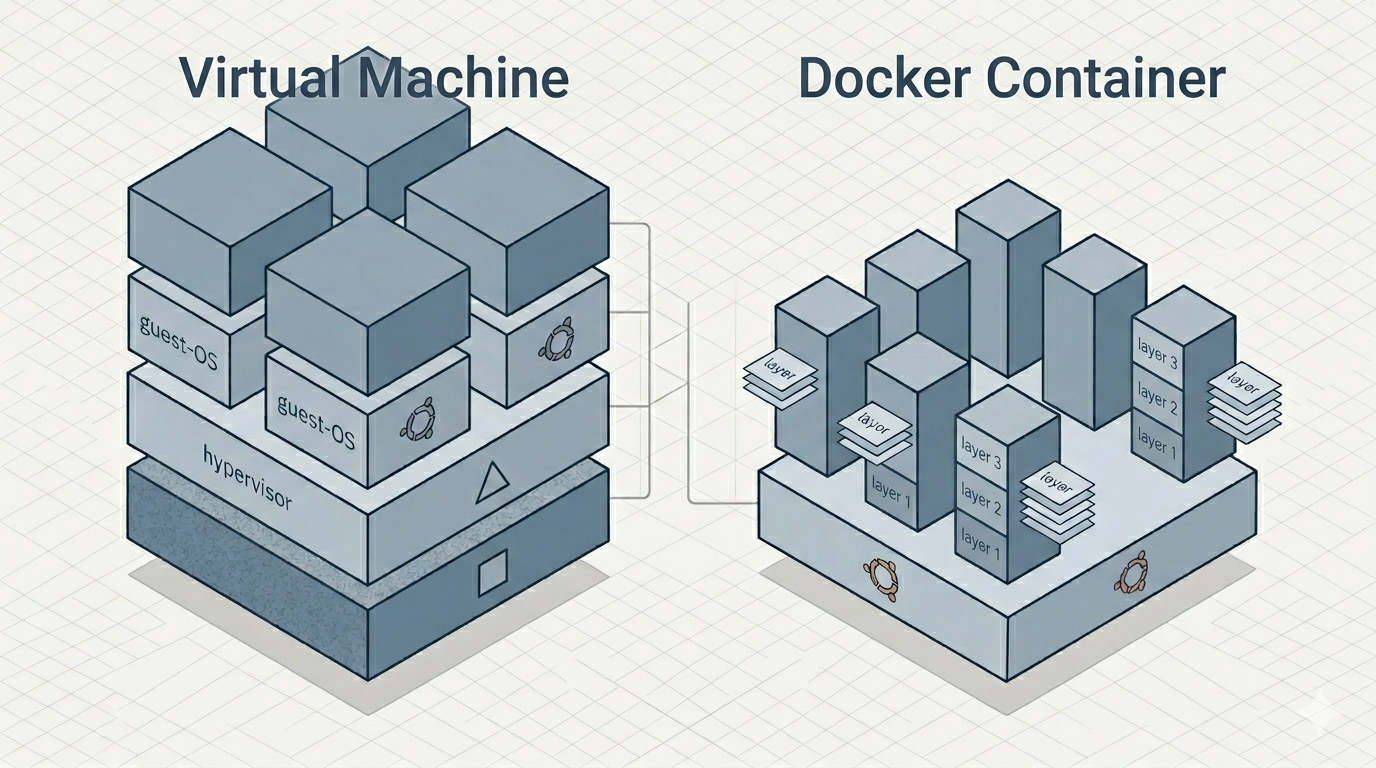
Images are built in layers. Each instruction in the build recipe produces a layer, and layers are cached and shared across images. If ten images derive from the same base, that base is stored once. This layering is a large part of why pulling and shipping images is cheaper than the size of a full environment would suggest.
Why It Gained Traction
The popularity is best explained as several practical pressures resolving at once:
- Reproducibility. The image pins the entire runtime environment, so the artifact tested in CI is bit-for-bit the artifact that runs in production. The class of "environment drift" defects largely disappears.
- Startup speed and density. A container is just a process; it starts in milliseconds and carries no separate operating system. A single host can run hundreds of containers where it might run only a handful of full virtual machines.
- A distribution model. Images are addressable by name and version and can be pushed to and pulled from registries, turning "deploy the app" into "pull this image and run it."
- Ecosystem alignment. Containers map cleanly onto microservice architectures and onto orchestration systems that schedule them across clusters, which gave the model a natural home in modern infrastructure.
Containers Versus Virtual Machines
This is the comparison that most often causes confusion, because both promise "isolation," but the mechanism differs fundamentally.
A virtual machine runs on a hypervisor (the software layer that emulates hardware for guest systems). Each VM contains a complete guest operating system — its own kernel, drivers, and system services — booted on virtualized hardware. A container, by contrast, has no guest kernel at all. It shares the host's kernel and isolates only at the process level.
The consequences follow directly from that one difference:
| Property | Container | Virtual Machine |
|---|---|---|
| Kernel | Shares the host kernel | Runs its own guest kernel |
| Isolation boundary | Process-level (namespaces, cgroups) | Hardware-level (hypervisor) |
| Startup time | Milliseconds | Seconds to minutes (full OS boot) |
| Footprint | Megabytes (app + libraries) | Gigabytes (app + full OS) |
| Density per host | High (hundreds) | Low (handful to dozens) |
| Isolation strength | Weaker; a shared kernel is a shared attack surface | Stronger; separate kernels |
| Guest OS choice | Must be compatible with host kernel | Any OS, including a different kernel |
The trade-off is not "newer and better" versus "older and worse." It is a deliberate exchange of isolation strength for efficiency. A VM can run Windows on a Linux host because it brings its own kernel; a Linux container cannot, because there is no separate kernel to bring. (On macOS and Windows, Docker quietly runs a small Linux VM in the background and starts containers inside it — a detail that surprises engineers who assumed they had escaped virtual machines entirely. They have not; they have merely confined the VM to one shared, well-managed instance instead of one per workload — which was rather the point.)
The weaker isolation boundary is the part most worth internalizing. Because every container on a host shares that host's kernel, a kernel-level vulnerability is, in principle, a shared exposure across all of them. Where workloads are mutually distrusting, that boundary may be insufficient on its own.
Where Images Come From
Images are stored in registries — networked repositories addressable by name and tag. The default public registry is Docker Hub, which hosts both community-published images and a curated set of official images (maintained baselines for common runtimes and services such as language interpreters, databases, and web servers). Beyond it sit alternatives such as the GitHub Container Registry, Quay, and the registries offered by major cloud providers; private registries are common inside organizations.
A reference such as python:3.12-slim names a repository (python) and a tag (3.12-slim) identifying a specific variant — here, a minimal Python 3.12 runtime on a stripped-down base. One operational caveat is worth flagging: anonymous pulls from the public Docker Hub are subject to rate limiting, which can interrupt automated pipelines that pull frequently without authentication.
Consuming Ready-Made Images
A large share of day-to-day value comes from simply running images someone else has prepared. The canonical example is obtaining a precise language runtime without touching the host installation:
# Drop into a Python 3.12 shell without installing Python on the host;
# --rm discards the container on exit, -it attaches an interactive terminal
docker run --rm -it python:3.12-slim python
The same pattern covers a surprising amount of routine work:
- Disposable service dependencies for development and testing — a database such as PostgreSQL or an in-memory store such as Redis, started in seconds and discarded just as fast, so a test suite runs against a real instance rather than a mock.
- Pinned toolchains — a specific compiler or build environment, so every engineer and every CI runner uses an identical version regardless of what their host carries.
- Web servers and reverse proxies — a configured server image fronting an application without a manual install.
The recurring theme is that the host stays clean: the runtime, its libraries, and its configuration live and die inside the container.
Building and Publishing a Custom Image
The typical lifecycle for a custom application is build → tag → push → pull-and-run. The build is driven by a Dockerfile, a declarative recipe whose instructions each produce a cached layer. A representative example for a Python service:
# Base image: a minimal Python 3.12 runtime
FROM python:3.12-slim

# Working directory inside the container's filesystem
WORKDIR /app

# Copy the dependency manifest first so this layer is cached and
# only rebuilt when requirements.txt actually changes
COPY requirements.txt .

# Resolve dependencies into the image; --no-cache-dir keeps the layer small
RUN pip install --no-cache-dir -r requirements.txt

# Copy application source after dependencies, so code edits don't
# invalidate the (slower) dependency layer above
COPY . .

# Informational: documents the port the service listens on
EXPOSE 8000

# Default process started when the container runs
CMD ["python", "app.py"]
The ordering here is not cosmetic. Because layers are cached, placing the rarely-changing dependency installation above the frequently-changing source copy means that an ordinary code edit rebuilds only the final layers, not the whole dependency tree — the difference between a one-second and a several-minute rebuild on each iteration.
The publish-and-deploy sequence then looks like this:
# Build and tag for a target registry namespace and version
docker build -t registry.example.com/team/myservice:1.4.0 .

# Authenticate, then push so other machines can pull it
docker login registry.example.com
docker push registry.example.com/team/myservice:1.4.0
On the target machine, deployment reduces to pulling the same tagged artifact and running it, mapping a host port to the container's port:
# -d runs detached; -p maps host:container ports
docker run -d -p 8000:8000 registry.example.com/team/myservice:1.4.0
The image that ran in CI is the image that runs in production. Nothing is reassembled from source on the target; the environment travels with the application.
The Container Lifecycle
A container moves through a small set of well-defined states, and most day-to-day operation is just transitions between them. Understanding the state machine removes most of the early confusion, because commands that appear interchangeable actually act on different transitions.
- Created.
docker createbuilds a container from an image and allocates its writable layer, but does not start the process. This is rarely used directly;docker runcombines create-and-start in one step. - Running. The contained process is executing and receiving CPU time.
docker runreaches this state directly;docker startbrings a previously stopped container back to it. - Paused.
docker pausefreezes every process in the container using the kernel's cgroup freezer — the processes are suspended in place, retain their full memory state, and simply receive no scheduling.docker unpauseresumes them exactly where they left off. This differs from stopping: nothing is terminated, so it is the appropriate transition when execution must halt momentarily without losing in-memory state. - Stopped (exited).
docker stoprequests an orderly shutdown by sendingSIGTERM, then waits a grace period (10 seconds by default, adjustable) before escalating toSIGKILLif the process has not exited. This two-stage sequence gives the application a chance to flush buffers and close connections.docker killskips the courtesy and sendsSIGKILLimmediately (or another signal on request). A stopped container is not gone — its writable layer persists on disk, so it can be restarted with its filesystem changes intact. - Removed.
docker rmdeletes the container and its writable layer permanently. This is the transition newcomers most often regret performing on a container holding state they assumed was safe.
docker run -d --name svc myimage:1.0   # create + start, detached
docker pause svc                       # freeze processes, keep memory state
docker unpause svc                     # resume where it left off
docker stop svc                        # SIGTERM, then SIGKILL after grace period
docker start svc                       # restart the stopped container, layer intact
docker rm svc                          # remove permanently (must be stopped first)
A subtlety worth internalizing: stopping a container preserves its writable layer but not the in-memory state of its processes — they are terminated. Pausing preserves the in-memory state but not CPU progress. Neither preserves data that the application only ever wrote to that ephemeral writable layer, which is the topic the next section exists to address.
Sharing Data and Filesystem Access
By default a container's filesystem is fully isolated: it is assembled from the image's read-only layers plus a thin writable layer on top, and it has no visibility into the host filesystem whatsoever. The host directory tree is simply not present inside the container unless access is granted explicitly. Equally important, anything written to that writable layer is discarded when the container is removed. Persistent or shared data therefore requires one of three deliberate mechanisms.
| Mechanism | What it is | Lifetime | Typical use |
|---|---|---|---|
| Named volume | Docker-managed storage outside the container's writable layer | Survives container removal until deleted explicitly | Persistent application/database data |
| Bind mount | A specific host path mapped directly into the container | Tied to the host path; outlives the container | Sharing source code or config between host and container during development |
| tmpfs mount | Storage held in host RAM, never written to disk | Vanishes when the container stops | Transient secrets or scratch data that must not touch disk |
# Named volume: Docker manages the storage location; data persists across
# container removal and re-creation
docker run -d -v app_data:/var/lib/app myimage:1.0

# Bind mount: a host directory appears inside the container at /app;
# :ro makes it read-only so the container cannot modify host files
docker run -d -v /home/user/project:/app:ro myimage:1.0
The distinction between the first two is the one that matters in practice. A bind mount couples the container tightly to the host's directory layout — convenient during development, because edits on the host are immediately visible inside the container, but fragile across machines whose paths differ. A named volume is managed by Docker in a location the user need not care about, which decouples the data from any particular host layout and makes it the better fit for production state. A recurring source of friction with bind mounts is file ownership: the user ID inside the container may not match the host's, so files created by the container can appear with unexpected ownership on the host.
Network data crosses the boundary separately from the filesystem. A container's network is isolated by default; publishing a port maps a host port to a container port so external traffic can reach the contained service:
# Host port 8080 forwards to the container's port 8000;
# traffic to the host on 8080 is delivered to the service inside
docker run -d -p 8080:8000 myimage:1.0
Influencing a Running Container from the Host
The host retains several levers over a running container without entering it, plus a means of entering it when inspection is required.
Configuration is supplied at launch, since an image is meant to be immutable and environment-specific settings belong outside it. Environment variables are the standard channel:
# -e injects individual variables; --env-file loads many from a file
docker run -d -e DATABASE_URL=postgres://... -e LOG_LEVEL=debug myimage:1.0
Resource consumption is bounded from the host through flags that map directly onto the kernel's control groups. Without limits, a container competes freely for the host's resources, so caps are how one workload is prevented from starving others:
# Hard memory ceiling and a fractional CPU allotment, enforced by cgroups
docker run -d --memory=512m --cpus=1.5 myimage:1.0
Restart behavior is delegated to the daemon via a restart policy, which determines whether a container that exits is brought back automatically — the difference between a service that self-heals after a crash or host reboot and one that stays down until a human intervenes:
# Restart automatically unless it was stopped deliberately by an operator
docker run -d --restart unless-stopped myimage:1.0
Observation and inspection happen through a few standard commands. docker logs retrieves the standard output and error streams the container has produced; docker inspect returns its full configuration and state as structured data; docker stats reports live resource usage. When the running state itself must be examined, docker exec starts an additional process inside the container — most commonly an interactive shell — without disturbing the main one:
docker logs -f svc                  # stream stdout/stderr as it is produced
docker exec -it svc /bin/sh         # open an interactive shell inside the container
docker stats svc                    # live CPU, memory, and I/O usage
The mental model that ties these together: configuration and limits are imposed at the boundary at launch time, the container's behavior is observed through its captured streams and inspected state, and direct entry via exec is the exception reserved for diagnosis rather than the normal mode of operation. The container is treated as a managed black box whose contract is its image, its ports, its mounts, and its resource envelope — not as a machine one routinely logs into.
When Docker Is Not the Right Tool
Containers are an abstraction with a specific shape, and several workloads sit awkwardly against it:
- Workloads needing a different kernel. A Linux container cannot run a Windows kernel workload or vice versa. Where the OS itself must differ, a virtual machine is the correct tool.
- Strong isolation between mutually distrusting tenants. The shared-kernel boundary may be too thin. Hardware-level isolation (VMs, or specialized sandboxing runtimes) is the more defensible choice.
- Hard real-time and tight latency determinism. The shared kernel and scheduler make worst-case timing harder to guarantee than on a dedicated or bare-metal target.
- Heavy GPU, kernel-module, or specialized-driver dependence. These cross the container boundary into the host kernel and require additional, sometimes fragile, plumbing.
- GUI desktop applications. Containers are built around headless processes; graphical workloads are possible but against the grain.
- Persistent state treated carelessly. A container's writable layer is ephemeral by design. Stateful data must be deliberately placed in external volumes, or it disappears with the container — a predictable source of data loss for newcomers who assume otherwise.
Conclusion
Docker's contribution is less a new isolation technology than a workflow that made an existing one usable: package the application with its environment, distribute it as a versioned image, and run it as a lightweight process that shares the host kernel. That shared kernel is the entire story — it is the source of the speed, density, and small footprint that distinguish containers from virtual machines, and equally the source of their weaker isolation boundary.
In operation, the model stays consistent: a container is a managed process whose lifecycle is a small state machine, whose filesystem is isolated unless volumes or bind mounts are granted explicitly, and whose configuration, resource limits, and restart behavior are imposed from the host at launch rather than baked into the image. Persistent data is the one thing that must be placed deliberately outside the container, because the writable layer is ephemeral by design.
The practical decision rule is straightforward. Containers are well suited to stateless or externally-stateful services, reproducible build and test environments, and dense deployment of many compatible Linux workloads on shared hosts. They are the wrong abstraction when the workload needs a different kernel, demands hardware-grade isolation between distrusting parties, requires hard real-time guarantees, or leans heavily on host-kernel-level hardware access. Matching the workload to the boundary — process-level for efficiency, hardware-level for separation — is the judgment that matters, and it is the one consideration that does not change with tooling versions.
References / Further Reading
- Docker, Inc. Docker Documentation. https://docs.docker.com/ — primary reference for the Dockerfile format, image/container model, volumes, and registry workflow.
- Open Container Initiative. OCI Image Format Specification. https://github.com/opencontainers/image-spec — the vendor-neutral standard underlying container image layering and metadata.
- Souppaya, M., Morello, J., & Scarfone, K. (2017). Application Container Security Guide (NIST Special Publication 800-190). National Institute of Standards and Technology. https://doi.org/10.6028/NIST.SP.800-190 — authoritative treatment of the container isolation boundary and its security implications.